


Trucker Tools
3.92.99K Reviews
App Specs
- Version
- 10.3.3
- Updated On
- License
- Free
- Downloads
- 1,000,000+
- Developer
- Trucker Tools
- Categories
- Maps & Navigation
- Platform
- Android, iOS
Screenshots
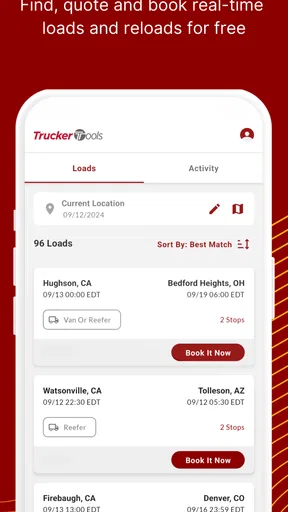
 Analysis by AppCompare
When I’m deciding whether a trucking app belongs on a working phone, I look beyond the feature list: does it suit the way I plan a trip, does it reduce the need to jump between tools, and can I tell when a separate source is still the safer choice? Trucker Tools is aimed at drivers who want several road and load-related resources together, rather than a general navigation app that happens to be useful for a truck. That distinction matters: it is best judged as a companion for trucking workflows, not as a universal replacement for every tool a driver may already use.
Getting Started with Trucker Tools
First things first, downloading and setting up Trucker Tools is a breeze. Available on both Android and iOS, the app is free to download. Once you’ve got it on your device, the registration process is straightforward. You’ll be asked for some basic info, and before you know it, you’re ready to roll.
The interface is clean and user-friendly. I was pleasantly surprised by how intuitive it is. Even if you’re not tech-savvy, navigating through the app feels natural. The dashboard is well-organized, giving you quick access to essential features like load tracking, fuel prices, and truck stop locations.
Features That Keep Truckers on Track
Now, let’s talk about what really sets Trucker Tools apart. This app is packed with features designed to make life on the road easier. Here are a few highlights:
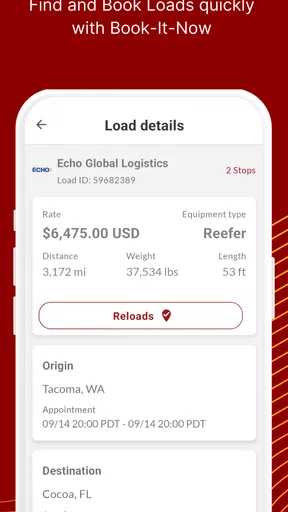
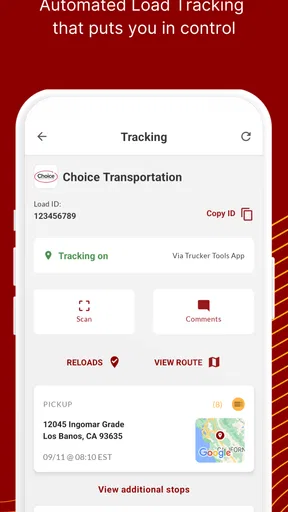
- Load Tracking: Stay on top of your shipments with real-time load tracking. You can easily see where your load is and get updates on delivery times. This feature is a game-changer for anyone dealing with tight schedules.
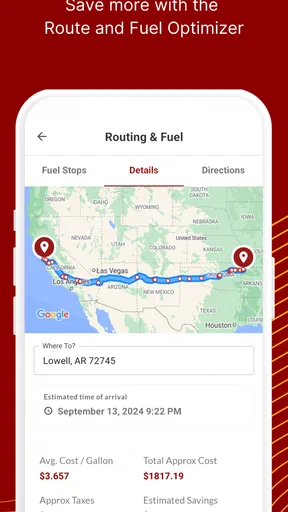
- Fuel Optimizer: With fuel prices fluctuating, this tool is invaluable. It shows you the cheapest fuel prices along your route, helping you save money on every trip.
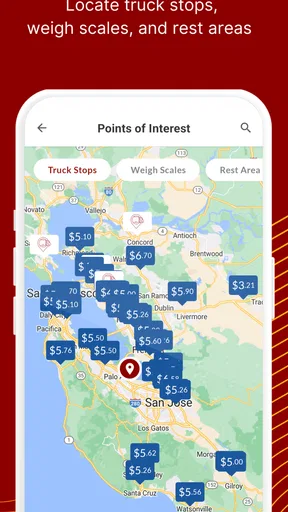
- Truck Stop Guide: Finding a good rest stop is crucial. This guide helps you locate truck stops with amenities you might need, from showers to dining options.
- Document Management: No more paper clutter! Digitally manage and store important documents directly within the app.
These features are all about convenience and efficiency, making the demanding job of trucking just a little bit easier.
Why Trucker Tools Stands Out
Its strongest argument is the combination. Load visibility, fuel planning, truck-stop search, and document storage address different moments in a trip, so there’s value in having them close together. I would not treat that convenience as proof that every screen replaces a specialist tool, though. A dedicated navigation app may be a better choice for route guidance, while a carrier’s preferred process may remain the authority for shipment updates. Think of this as a useful working hub, then verify time-critical details where your job requires it.
Moreover, the app’s performance is impressive. I noticed minimal lag time, and the updates are frequent, ensuring that you have the latest features and improvements. The developers are clearly committed to providing a top-notch experience.
Worth Reading Before You Choose

EA SPORTS FC Mobile 26 Is a Bigger Football Game, but It Takes Time

Flipboard Shows What News Apps Must Do Beyond the Feed

Switching to Android Auto Means Rethinking Your Driving Routine

Google Calendar Makes a Crowded Week Easier to Manage

Ludo King Makes the Most of the Minutes Between Plans

Baby Panda World Brings Quick Play to Modern Phones, but Its Game Library Feels Busy
For a practical workflow, I’d check a load’s status before setting off, look over fuel options while planning a stop, and use the truck-stop guide to shortlist a place that fits the break I need. I would avoid making searches or handling paperwork while driving; this kind of app is most useful when set up before departure or checked when safely parked. That small habit makes the convenience more meaningful and keeps the phone from becoming another distraction in the cab.
Community and Support
Another aspect worth mentioning is the community support. The app has a dedicated section where truckers can share tips and experiences. It’s like having a virtual crew that’s always got your back. Plus, if you run into any issues, the customer support team is responsive and helpful. They genuinely seem to care about resolving any glitches or questions you might have.
There’s also a feedback feature within the app, so you can directly communicate with the developers about what’s working and what’s not. It’s nice to know that your input can help shape future updates.
Choosing It Alongside Other Road Apps
The usual alternatives fall into a few groups: general map apps, truck-focused route planners, and separate services for fuel, stops, or shipment visibility. A general map is often the simpler pick for ordinary directions, but it may not bring the trucking-oriented tools together in the same way. A dedicated route planner can make more sense when truck-specific routing is the central need. Trucker Tools is more appealing when the day involves coordinating load information with practical stops and documents, and you want fewer separate apps to open.
For example, imagine leaving a delivery and needing to prepare for the next leg. You can review the shipment information, compare fuel options along the planned journey, and identify a suitable truck stop before pulling out. That sequence is where a combined toolkit can save taps and reduce mental clutter. It does not remove the need to judge whether a stop works for your actual schedule or to confirm important load details through the channels your dispatcher expects.
One useful trade-off is that an all-in-one dashboard can make routine checks faster, but it also encourages relying on one place for information that may have different sources and update patterns. I’d use the app to organize a decision, not assume every listing or status is a final confirmation. If a delivery window is tight, or a fuel choice has a serious cost implication, double-check the detail before committing. That cautious approach is especially sensible when several people are coordinating the same load.
If you are deciding whether to replace an app you already use, I would not uninstall anything on day one. Keep your current route tool and paperwork routine available while you try the relevant parts of Trucker Tools on a normal run. Notice which screens you actually return to and whether they fit your dispatch process. If the app earns a regular place in your workflow, you can simplify later; if not, you have avoided disrupting habits that already work.
Who Will Get the Most From It
I see the clearest fit for professional drivers who regularly need to check loads, plan fuel stops, find truck-oriented amenities, and keep documents close at hand. It can also suit someone newer to trucking who would rather explore a consolidated set of resources than assemble a collection of separate apps immediately. The benefit is not that every task becomes effortless; it is that common trip-planning tasks are grouped in one place.
It is less compelling if you only need turn-by-turn directions, rarely handle load information, or already have a dependable company workflow that covers the same jobs. In those cases, adding another account and another dashboard may create more upkeep than value. Likewise, if your main concern is detailed truck-specific routing, choose a tool built around that priority and use this app only if its other functions fill a real gap.
A practical question before relying on it is whether it suits your particular phone and routine. Trucker Tools is free and carries an Everyone content rating. It was released on August 1, 2011, and version 10.3.2 is the current version; the minimum operating-system requirement is 7.0. The app is made by Trucker Tools, and its Maps & Navigation focus is reflected in its trucking-oriented role. Its average rating is 3.8 from around 9,100 ratings, with roughly 3,000 written reviews and over a million installs. Those figures suggest an established audience, but they do not tell me whether it will match an individual carrier’s process, so I’d judge it on the tasks I need it to handle.
Before a long shift, I’d also make a quick personal checklist: confirm that I can access the documents I expect to need, check how the load view fits with the information I receive from work, and identify whether I still want a separate map open for directions. This is a better test than browsing every feature once and assuming the app is ready for every situation. A few calm minutes before departure can reveal whether it genuinely simplifies the routine or simply adds another place to check.
Final Thoughts
So, is Trucker Tools worth the download? Absolutely. It’s a robust app that delivers on its promises, providing essential tools that every truck driver can benefit from. Whether you’re tracking loads, optimizing fuel costs, or finding the best truck stops, this app has you covered.
If you’re a trucker or involved in logistics, give Trucker Tools a try. It might just become your new favorite travel companion on the road. Safe travels!
My recommendation is strongest for drivers who will use several of its trucking-focused tools, not just one. Start with the task that causes the most friction in your day—perhaps checking a load, looking for a suitable stop, or keeping documents organized—and see whether the app makes that task easier without replacing a workflow you trust. If it does, keeping it alongside a dedicated navigation option is a sensible balance. If all you need is basic directions, or your existing tools already handle these jobs cleanly, you can skip it without missing an essential part of your setup.
Pros
- User-friendly interface makes navigation simple.
- Real-time load tracking for efficient planning.
- Comprehensive load board access.
- Integrated truck stop guide and parking locator.
- Fuel optimizer helps reduce costs.
Cons
- Requires internet for full functionality.
- Limited features in free version.
- Occasional GPS inaccuracies reported.
- Interface can be slow on older devices.
- Some features require in-app purchases.
FAQs for Trucker Tools
What features does Trucker Tools offer to help truck drivers?
Trucker Tools provides several features aimed at making life easier for truck drivers. These include real-time load tracking, a truck stop guide, fuel price comparisons, and a freight matching service. Additionally, the app offers a load planner and a weather and traffic update feature, ensuring drivers have all necessary information at their fingertips.
Is Trucker Tools free to use, or are there any subscription fees?
Trucker Tools is free to download and use, though some features may require in-app purchases or subscriptions. The core functionalities like load tracking and truck stop guides are available without charge, but premium features might involve additional costs. Always check the app store for the latest pricing details before downloading.
How accurate is the real-time load tracking in Trucker Tools?
The real-time load tracking in Trucker Tools is highly accurate, using GPS technology to provide precise updates. This feature allows both drivers and dispatchers to monitor the location of loads, ensuring timely deliveries. The app also provides notifications and alerts for any significant changes, which enhances operational efficiency.
Can I use Trucker Tools offline, and what features are available without an internet connection?
Some features of Trucker Tools can be accessed offline, such as saved routes and truck stop information. However, functionalities like real-time load tracking and traffic updates require an internet connection. It’s recommended to download necessary data beforehand if you anticipate being offline during your journey.
Is Trucker Tools available on both Android and iOS platforms?
Yes, Trucker Tools is available for both Android and iOS devices. You can download it from the Google Play Store for Android or the Apple App Store for iOS. The app is regularly updated to ensure compatibility with the latest operating systems and to introduce new features.


